
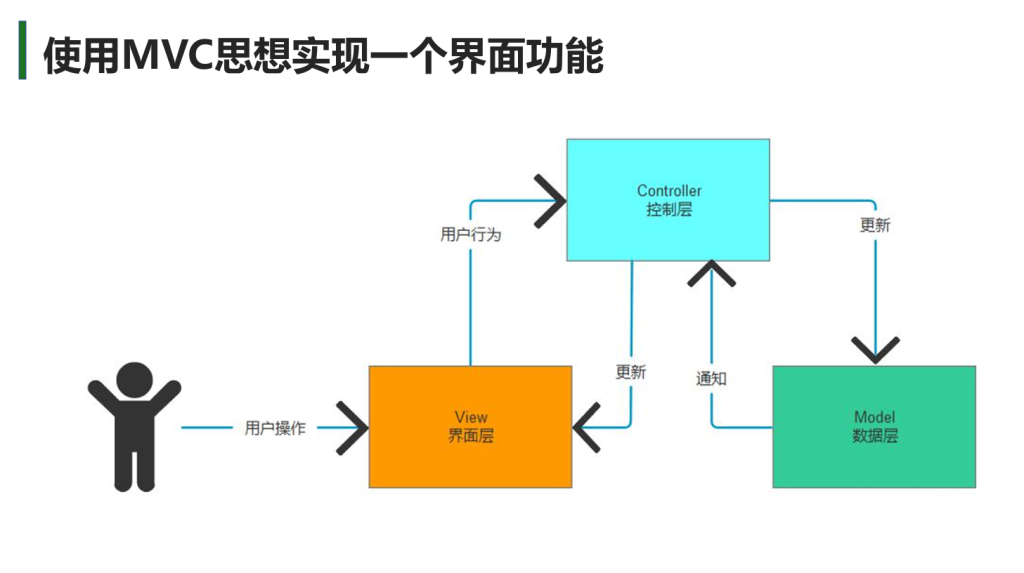
MVC
Model 数据
View 界面
Controller 业务逻辑
三者分离即MVC思想
MVP
严格断绝MV之间的联系,完全由主持人Presenter来控制,直接与MV交互。
比如MVC是在Controller中调用View的方法来更新View,其中View更新会涉及到View与Model的交互
而MVP是在Presenter中直接改变View,将原本在View中更新的方法迁移到Presenter中来,断绝View和Model之间的交互
MVVM
VM:ViewModel
关键是V和VM数据的双向绑定,改变其中一个另一个也会改变
MVE
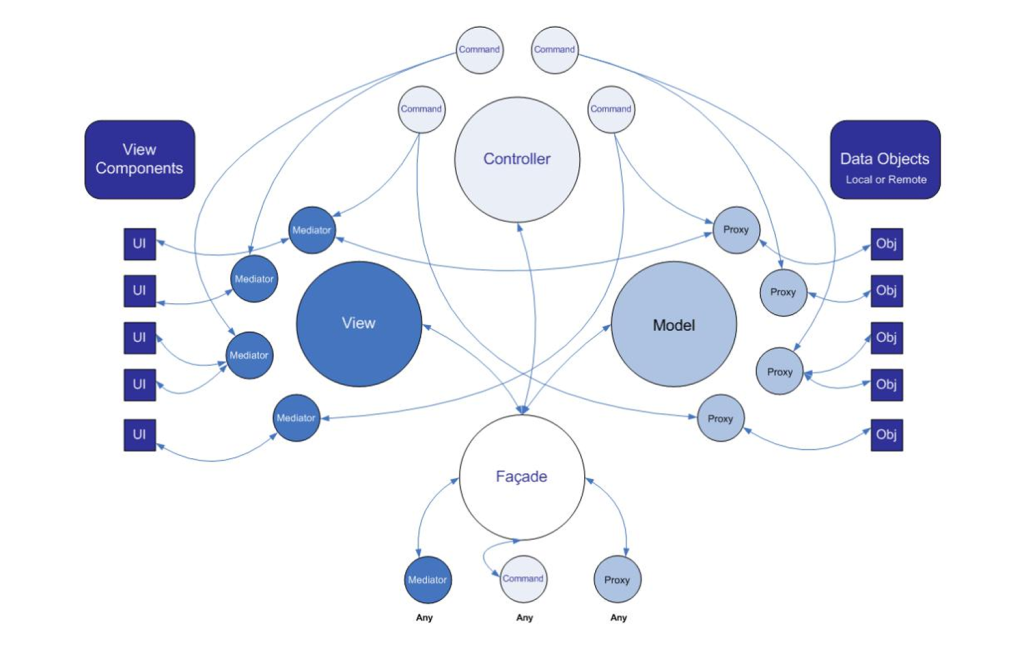
PureMVC
- Model和Proxy
- 继承PureMVC中的Proxy父类
- 写构造函数
- 代理的名字Name
- 代理的数据Data
- View和Mediator
- 继承PureMVC中的Mediator父类
- 写构造函数
- 代理的名字Name
- 代理的UI组件ViewComponent
- 重写监听通知的方法 ListNotificationInterests()
- 重写处理通知的方法 HandleNotification(INotification notification)
- (可选)重写注册时的方法 OnRegister()
- Facade
- 继承PureMVC中的Facade父类
- 写单例模式
- 重写初始化控制器InitializeController()
- 调用RegisterCommand(PureNotification,( ) => { return new MyCommand ( ); };)以注册指令
- 在Main脚本里调用上方的自定义方法来调用SendNotification的内容( 或直接SendNotification )
- Command
- 继承PureMVC中的SimpleCommand父类
- 重写Execute,以实现操作
- 通过notification.Body.ToString()可以得到SendNotification传入的参数信息
- 如下注意
- 注册Mediator
- 赋值ViewComponent
- string panelName = notification.Body.ToString();
switch (panelName)
{
case “MainPanel”:
// 注册Mediator
if (!Facade.HasMediator(NewMainViewMediator.NAME))
Facade.RegisterMediator(new NewMainViewMediator());
// 赋值mediator.ViewComponent
NewMainViewMediator mediator = Facade.RetrieveMediator(NewMainViewMediator.NAME) as NewMainViewMediator;
if(mediator.ViewComponent == null)
{
GameObject obj = GameObject.Instantiate(Resources.Load<GameObject>(“UI/MainPanel”));
GameObject canvas = GameObject.Find(“Canvas”);
obj.transform.SetParent(canvas.transform, false);
mediator.ViewComponent = obj.GetComponent<NewMainView>();
}
break;
case “RolePanel”:
break;
default:
break;
}
- 如下注意

评论(0)
暂无评论